
A three-year-old laptop that used to run for eight hours on a charge and now dies in two isn’t broken — it’s aging the way every lithium-ion battery does. So how long should a laptop battery last, both on a single charge and across its full working life? The short answer: most modern laptops should deliver 6 to 10 hours of daily use per charge when new, and the battery pack itself typically remains useful for 2 to 4 years, or roughly 300 to 1,000 full charge cycles, before it needs replacing. The exact number depends heavily on your laptop’s brand, battery capacity, and how you charge and use it, which is what the rest of this article breaks down.
How Long Should a Laptop Battery Last on a Single Charge?
On a single full charge, a laptop bought in 2026 should reasonably run for 6 to 10 hours under everyday tasks such as browsing, word processing, and video calls. Ultraportable and business-class machines with larger cells and efficient processors can stretch past 12 hours, while gaming laptops often fall closer to 2 to 4 hours under sustained load, since demanding components draw far more power than advertised figures assume.
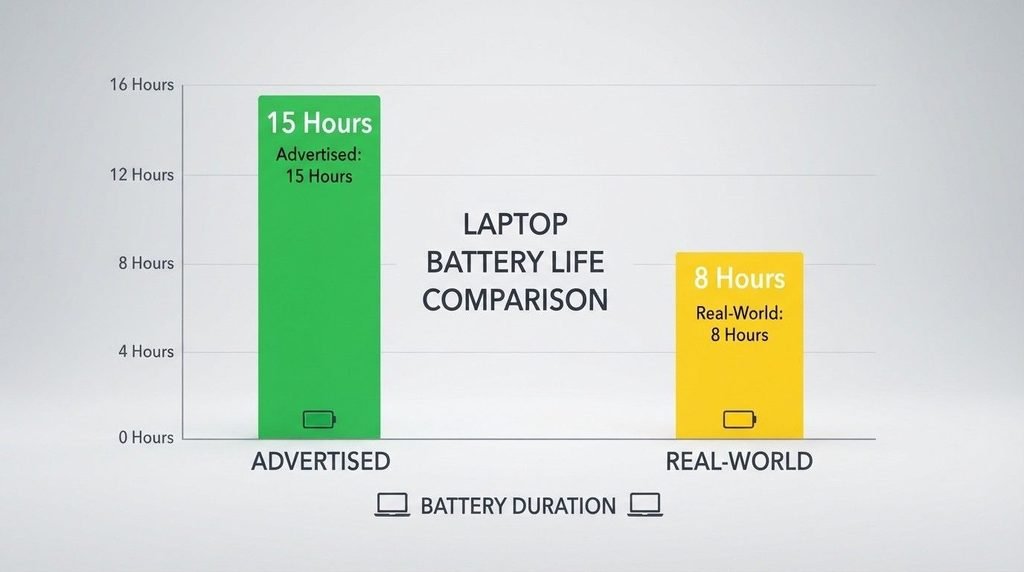
It helps to separate advertised battery life from real-world battery life. Manufacturer specs are measured under controlled conditions — low brightness, minimal background activity, idealized workloads — so actual runtime for most people lands lower than the number on the box. A laptop rated for 10 hours might realistically deliver 6 to 7 hours once you factor in brightness, browser tabs, streaming, and background updates.
Is 2 Hours of Battery Life Good for a Laptop?
Two hours of battery life is considered low for a modern general-purpose laptop, but it isn’t automatically a sign of a failing battery. For a gaming laptop or a mobile workstation running intensive software, 2 hours under full load is fairly typical, since these machines prioritize performance over efficiency. For a standard office laptop, however, 2 hours usually points to either an aging battery, background processes draining power, or a display and processor running at maximum settings continuously.
Is 4 Hours Good for a Laptop Battery?
Four hours is a reasonable, middle-of-the-road result for everyday tasks on a laptop that’s a year or two old, especially if the battery has already lost some of its original capacity. For a brand-new mainstream laptop, 4 hours is on the lower end of acceptable and may suggest the power plan is set to high performance rather than balanced or power-saving mode.
How Long Should a Laptop Battery Last Overall (Calendar Life and Charge Cycles)
Beyond daily runtime, the more important long-term question is how long the battery pack itself survives before its maximum capacity drops too low to be useful. Lithium-ion laptop batteries are generally engineered for 300 to 1,000 full charge cycles, with mainstream consumer laptops typically rated toward the lower end of that range and premium or business models rated higher. A full charge cycle counts as using 100% of the battery’s capacity, whether that happens in one sitting or spread across several partial charges.
In calendar terms, this usually translates to about 2 to 4 years of solid performance for typical daily use. <cite index=”15-1″>Dell’s own support documentation notes that typical users will likely notice reduced runtime after 18 to 24 months, while power users running demanding applications may see a decline within 18 months</cite>. HP cites a similar 2- to 4-year, roughly 1,000-cycle range, though real-world reports on HP’s support forums describe outcomes from under a year to well beyond five, depending on heat and usage intensity.
How Long Should a New Laptop Battery Last When Fully Charged
A brand-new laptop battery should hold close to 100% of its rated capacity and deliver the manufacturer’s advertised runtime, or something reasonably close to it, for the first several months of ownership. It’s normal for a new battery to show a slightly shorter runtime during the first few charge cycles as the internal battery gauge calibrates itself to the cell’s actual capacity. Manufacturers generally don’t require a special “break-in” charging routine for modern lithium-ion packs—using the laptop normally for the first week or two is sufficient for the battery meter to settle into accurate readings.
Brand-Specific Expectations: Dell, HP, and Lenovo
Because so many readers search by brand, it’s worth breaking down expectations by manufacturer, even though the underlying battery chemistry is largely the same across brands.
How long should a laptop battery last on a Dell? Dell batteries are typically rated for 300 to 500 charge cycles, translating to roughly 2 to 3 years of dependable use for most people, with some well-maintained units lasting 4 years or more. Dell’s support resources emphasize that battery lifespan varies by usage pattern rather than a fixed number, and Dell treats batteries as a separate, shorter-warranty component from the rest of the laptop.
How long should a laptop battery last when fully charged on a Lenovo? Lenovo’s ThinkPad and IdeaPad lines generally target a similar 2- to 4-year window, and many ThinkPad models include a built-in battery conservation setting in Lenovo Vantage that intentionally caps charging around 80% to reduce long-term stress on the cell—a feature aimed squarely at users who leave their laptop plugged in most of the day.
HP laptop battery life in hours tends to range from about 6 hours on budget Pavilion-series machines to 10–15 hours on premium Spectre and EliteBook models with larger battery cells, though these figures reflect light usage rather than continuous, demanding work.
How Long Should a Laptop Battery Last on Windows 10?
The operating system itself has limited direct impact on how long should a laptop battery last, since battery chemistry ages independently of software. That said, Windows 10’s power settings, background app permissions, and driver efficiency can affect daily runtime and, over time, how many charge cycles you accumulate. Laptops still running Windows 10 tend to be a few years old already, so shorter runtime compared to a new Windows 11 machine usually reflects battery age and older hardware rather than the OS itself.
How Many Hours Should a Laptop Battery Last in a Day?
For someone using a laptop across a typical workday with breaks, a battery that delivers 6 to 8 hours of active screen time is generally considered solid performance in 2026. This assumes intermittent rather than continuous use — checking email, drafting documents, attending a few video calls — spread across an 8-hour day rather than eight uninterrupted hours of processor-intensive work.
Why Does My Laptop Run Out of Battery So Fast?
Several common factors explain rapid battery drain, often in combination rather than isolation:
- Screen brightness set high — the display is typically the single largest power draw on a laptop.
- Too many background processes — cloud sync tools, browser tabs, and startup applications continue consuming power even when you’re not actively using them.
- Battery age and cycle count — a battery beyond 500–1,000 cycles or 2–4 years old simply holds less charge than it did new.
- Heat exposure—using a laptop on soft surfaces that block airflow or in warm environments—accelerates chemical degradation inside the cell.
- Outdated drivers or firmware—inefficient power management drivers can prevent the processor from stepping down properly during idle periods.
- High-performance power plans — running the laptop in maximum-performance mode instead of balanced mode increases processor voltage and draw.
Practical Steps to Extend Your Laptop Battery’s Lifespan
Reasonably good habits can meaningfully slow degradation, even though no laptop battery lasts indefinitely.
- Keep the battery between roughly 20% and 80% charge for daily use where your laptop supports a charge-limiting feature, rather than always charging to 100%.
- Avoid letting the battery sit at 0% for extended periods, and avoid storing an unused laptop fully drained.
- Keep the laptop in a cool, well-ventilated space, since heat is one of the fastest accelerators of lithium-ion degradation.
- Lower screen brightness and close unused background applications during battery-powered sessions.
- Use the manufacturer’s power-management software (Dell Power Manager, Lenovo Vantage, HP Support Assistant) to monitor battery health and set sensible charge limits.
- Keep drivers and firmware updated, since manufacturers periodically release efficiency improvements.
For readers weighing whether it’s more sensible to nurse an aging battery or plan around it, our guide on laptop maintenance tips covers broader upkeep habits that also help protect battery health alongside overall system performance.
Signs It’s Time to Replace Your Laptop Battery
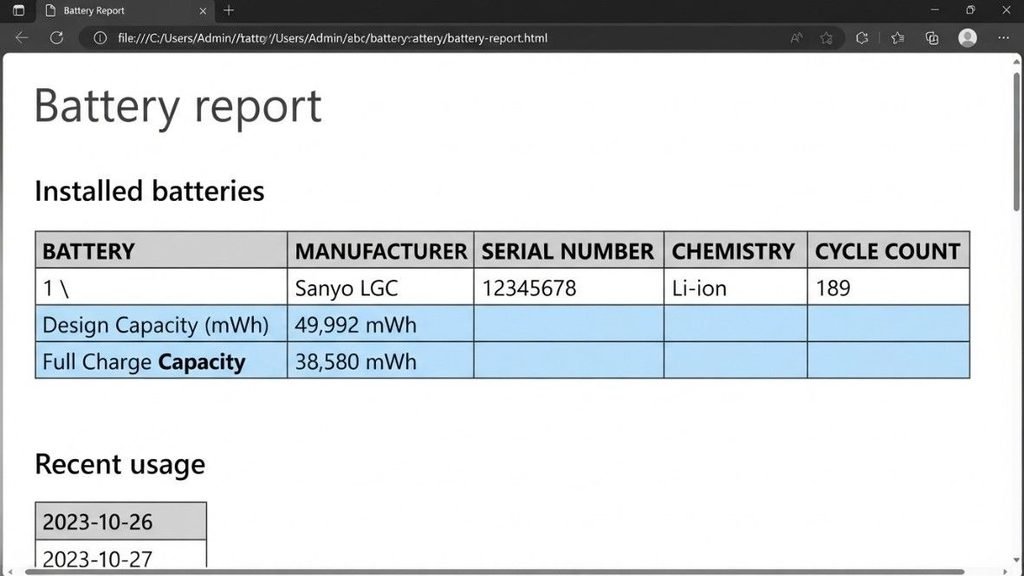
A battery is generally worth replacing when the laptop shuts down unexpectedly despite showing remaining charge, the percentage drops rapidly within minutes of unplugging, the casing shows visible swelling, or runtime has fallen to a fraction of what it delivered when new. Windows includes a built-in diagnostic that reports design capacity versus current full-charge capacity — the most objective way to confirm genuine degradation rather than a software setting issue. <cite index=”26-1″>Microsoft’s own support documentation explains that running the powercfg/batteryreport command from an administrator command prompt generates an HTML file containing this detailed capacity and usage information</cite>. If that report shows full-charge capacity well below 60–70% of design capacity, replacement is usually more practical than working around a diminished battery.
If you’re specifically comparing how long a Dell or HP unit tends to hold up against these thresholds before replacement makes sense, our deeper dive on Dell laptop lifespan expectations walks through typical timelines by usage profile.
2026 Developments in Laptop Battery Technology
Battery technology keeps shifting gradually rather than dramatically. Recent ultraportable laptops increasingly use silicon-carbon anode cells, packing more energy into the same space and contributing to longer advertised runtimes on 2025 and 2026 flagship models. Adaptive charging, which slows or pauses charging near 100%, has also become more common, reducing time spent at full voltage — one of the more stressful conditions for cell health. These improvements shift the averages somewhat, but they don’t change the fundamental chemistry behind how long should a laptop battery last—cycles, heat, and time still drive degradation.
FAQs
How long should a laptop battery last before it needs replacing? Most laptop batteries need replacing after 2 to 4 years of regular use, or somewhere between 300 and 1,000 full charge cycles, whichever comes first. Heavy daily use and heat exposure tend to shorten that window.
How long does a laptop battery last in a day under normal use? For typical office-style tasks spread across a workday, 6 to 8 hours of active use is a realistic expectation for a laptop that’s still in good condition, though continuous demanding tasks will drain it faster.
Is it bad to keep my laptop plugged in all the time? Keeping a laptop plugged in constantly isn’t inherently dangerous with modern battery management systems, but sitting at 100% charge for long stretches does add mild long-term stress to the cell. Many laptops now include a charge-limiting mode specifically to reduce this effect.
How long should a new laptop battery last when fully charged? A new battery should deliver close to the manufacturer’s advertised runtime, allowing for some variance during the first few charge cycles while the internal battery gauge calibrates.
Why does my laptop battery drain so fast even though it’s still new? Fast drain on a new laptop is usually caused by high screen brightness, background applications, a high-performance power plan, or occasionally a driver issue rather than the battery itself being defective.
Does using my laptop while it’s charging damage the battery? Occasional use while charging is fine on modern laptops. Sustained heavy use while plugged in generates extra heat, which contributes to gradual wear, but it won’t cause immediate damage.
Can I replace a laptop battery myself? On many consumer laptops, yes — batteries are accessible with basic tools and a genuine replacement part. On slim ultraportables with glued-in batteries, professional service is usually safer and often required to maintain water resistance or structural integrity.
Conclusion
Putting it all together, how long a laptop battery should last comes down to two separate numbers: 6 to 10 hours on a single charge for most modern laptops and 2 to 4 years or 300 to 1,000 charge cycles for the battery pack overall. Brand, build quality, heat exposure, and daily habits all shift these numbers up or down, which is why a Dell, HP, or Lenovo laptop can show meaningfully different results even with similar specs. If your runtime has dropped sharply or your laptop shuts down without warning, checking the built-in battery report is a faster and more reliable next step than guessing, and it will tell you clearly whether a replacement is actually justified.