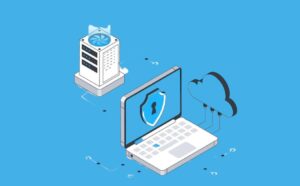

Running a law firm today is more challenging than ever. You’re not just handling legal cases—you’re managing massive amounts of sensitive client data. From contracts and litigation files to financial records and intellectual property, the information you handle is incredibly valuable and must be protected at all costs. Traditional storage methods, like on-premise servers, file cabinets, or even locked office drawers, simply can’t keep up with modern demands. Servers can crash, data can get lost, and hackers are constantly looking for vulnerabilities. In fact, law firms are considered prime targets for cyberattacks, and a single breach could result in catastrophic financial and reputational losses.
This is where a private cloud for law firms comes in. Unlike public cloud solutions, a private cloud is exclusive to your firm, offering a secure, centralized environment for storing, accessing, and managing all your legal documents and software. It allows your team to work from anywhere, ensures enterprise-grade security, and eliminates the headaches of maintaining servers in-house.
In this guide, we’ll explore everything about private clouds for law firms—how they work, the benefits, migration steps, and real-world examples—so you can make an informed decision and upgrade your firm’s IT infrastructure with confidence.
What Is a Private Cloud for Law Firms?
Private cloud means an organization’s cloud environment. It is in complete contrast with public clouds that are collectively used by multiple businesses. Therefore, the private cloud single-tenant is one. A law firm is able to relinquish its control of the servers, software, and data only at very limited times, if any, under a private cloud.
In simple words, it’s like getting rid of your traditional office servers and using the internet to connect with a secure cloud-based environment.
Reasons Why Law Firms Are Cybercriminals’ Favorites
A law firm is a vehicle of information. Thus, hackers can easily thrive by disclosing or reselling your law firm’s data. Examples of data are as follows: legal documents, financial records, intellectual property, and personal information. To illustrate, a mid-size law firm that depended solely on the on-prem server was attacked by ransomware. The encryption of the client files failed to operate in this case, as the court deadlines were at risk. The amount demanded as ransom was more than six figures. Switching to a private cloud for law firms will help in lowering this threat to almost zero, as there will be real-time monitoring, and the security level will be that of an enterprise.
How Does a Private Cloud Work?
You may consider a private cloud as a server in your office, which is virtual and can be accessed by your employees from any place.
- Secure Virtual Desktop Access: People in the team get an account on the virtual desktop, alas not their physical desktop, through which they can access their email, Word, Excel, legal practice management tools, and billing systems. By doing this, they always run on the cloud and are never seen in local devices.
- Centralized Data Storage: This is a secure and centralized location where you can keep your documents and applications, which, in turn, means no more working on different versions, having duplicate files, or losing documents. Remote employees are no longer left out when it comes to team collaboration.
- Enterprise-Level Security: Your law firm will be protected with enterprise firewalls, intrusion detection systems, military-grade encryption, two-factor authentication, and 24/7 monitoring when you sign with private cloud providers.
Top Benefits of a Private Cloud for Law Firms
Security and Compliance: Private clouds provide legal data security and enable firms to comply with the ABA’s guidelines on cybersecurity. They use access control, automatic patching, and encrypted storage to prevent unauthorized access.
No More IT Problems: Server crashes, hardware downtime, and maintenance can be a thing of the past. Your provider takes care of the updating, backup, and disaster recovery aspects, thus allowing your team to spend more time with clients.
Work Remotely: Being able to access work from different locations gives lawyers the freedom to work anytime and anywhere. They just need to log in securely from their home, court, a second office, or while travelling, and that too, without the use of VPNs or slow remote connections.
Centralized Multi-Office System: If one office chooses to use a private cloud, then the rest of the offices must have access to the same system. This way, errors will be lessened with real-time updates, and efficiency is at its best even if there are multiple locations.
Cost Savings: Private clouds help to lower the overall cost of ownership. They feature predictable monthly pricing, pay-for-what-you-use models, and scalable resources, which makes budgeting easier.
Private Cloud vs Public Cloud
Public clouds like AWS and Azure offer scalability; they are shared environments. For law firms, isolation and control are critical.
A private cloud is single-tenant, customizable, and designed for compliance, making it ideal for firms handling highly confidential matters.
Step-by-Step Guide to Migrating to a Private Cloud
Step 1: Evaluate Your Current IT Infrastructure
Check server reliability, backup practices, and encryption standards. Identifying weaknesses early avoids costly mistakes.
Step 2: Choose a Legal-Focused Cloud Provider
Look for providers with experience hosting legal software, document management systems, and secure remote access.
Step 3: Plan the Migration
A professional provider will assess your current setup, stage the migration to minimize downtime, and transfer data securely.
Step 4: Train Your Staff
Virtual desktops are intuitive. Most employees adapt within days, making remote work smooth and secure.
Step 5: Optimize Continuously
Monitor usage, adjust resources, reduce costs, and enhance security policies as your firm grows.
Real-World Example
A 12-employee litigation firm faced server crashes, slow remote access, and unpredictable IT costs. After moving to a private cloud for law firms, downtime dropped to zero, remote work became seamless, and IT expenses became predictable. The managing partner said,
“We wish we had switched sooner.”
FAQs
Is the cloud less secure than in-office servers?
No. Professional data centers have biometric access, redundant power, and multiple backup layers, far exceeding most small firm setups.
Will migration disrupt operations?
Properly managed migration is staged and minimizes downtime. Staff can continue working almost uninterrupted.
Is it affordable for small firms?
Yes. Private clouds often cost less than maintaining aging hardware, and monthly expenses are predictable.
Can I work remotely securely?
Absolutely. Virtual desktops allow encrypted, device-independent access.
Does it comply with legal regulations?
Yes. Providers ensure ABA and state-level compliance.
Conclusion
A private cloud for law firms is more than IT infrastructure — it’s a strategic investment. It provides security, centralized operations, remote flexibility, predictable costs, and scalability. In today’s world of increasing cyber threats and hybrid work, moving your firm to the cloud isn’t optional — it’s essential.
Secure your firm’s data, streamline your operations, and focus on clients. Choosing the right private cloud solution is investing in your firm’s future.